You’re looking for the best free transcription software for Mac, aren’t you? You’re at the right place. Whether you’re a student, professional, or content creator, finding the right tool to transcribe audio or video can save you hours of work.
The good news? There are powerful free options out there. This article answers, “Is there a free transcription app on Mac?” Moreover, it helps you find the best free audio transcription software for Mac you’ve been looking for.
Finally, this article describes the Krisp AI Meeting Assistant as one of the best free transcription software that boosts productivity and makes transcription effortless.
How to Choose the Best Free Transcription Software for Mac
To choose the right transcription software free for Mac, consider its technical capabilities and your budget. Here are the key factors to consider:
Accuracy
Look for software that delivers high transcription accuracy, especially for complex vocabulary or multiple speakers.
Real-Time vs. Post-Meeting Transcription
Decide if you need real-time transcription (e.g., for live meetings) or post-meeting transcription for recorded files.
Language Support
Ensure the software supports the languages or accents relevant to your audience.
Integration With Other Tools
Pick software you can integrate with your apps, such as Zoom, Google Meet, or project management tools.
Ease of Use
Check if the interface is user-friendly and offers intuitive controls for editing and sharing transcripts.
Customization Options
Look for features like keyword tagging, speaker identification, and adding a custom dictionary for niche terms.
Pricing and Free Trials
Evaluate the software’s cost against your budget and look for free trials to test functionality.
Speed of Transcription
If time is a priority, choose software with fast turnaround times for transcription. This is especially vital in AI-assisted online education.
Security and Privacy
Ensure the software complies with data protection standards like GDPR or HIPAA if you handle sensitive content.
Additional Features
Features like noise cancellation, editing tools, or meeting summaries can enhance usability.
Finally, you may wonder, “Does Mac have built-in transcription?” Yes, Mac has built-in transcription features through its Dictation tool, allowing users to convert speech to text. However, it’s limited to basic tasks and lacks advanced transcription functionalities like speaker identification or editing.
Let’s take a closer look at free audio-to-text transcription software for Mac.
1. Krisp AI Meeting Assistant
The Krisp AI Meeting Assistant is automatic transcription software for Mac free. Krisp’s AI Meeting Assistant offers a unique blend of transcription and noise cancellation, making it ideal for Mac users in noisy environments. This free AI transcription tool ensures crystal-clear audio and exceptionally accurate real-time transcriptions.
Pros:
96% accuracy of real-time, automated, multi-lingual transcription and stellar speaker recognition
Noise cancellation for distraction-free transcriptions
Easy integration with Zoom, Google Meet, and Microsoft Teams
Cons:
Some advanced features, including custom vocabulary and extended meeting history, require premium plans.
2. Otter.ai
Otter.ai is another automatic transcription software free for Mac. This free AI transcription tool offers automatic summaries, keyword identification, and collaborative editing. It integrates with calendars and records meetings directly.
Pros:
Real-time transcription with playback synchronization
Smart keyword highlights for easy navigation
Integrates with Google Calendar and Zoom
Cons:
Advanced features are limited to paid plans
Occasional errors with heavy accents
3. Fireflies.ai
Fireflies.ai is another free transcription software for Mac. Fireflies automates meeting transcriptions and captures insights. With its AI-powered note-taking and seamless integrations, this free transcription software simplifies collaboration and ensures no detail is missed.
Pros:
Automated meeting transcription with action items
Supports integrations with major platforms like Zoom and Slack
Offers advanced search capabilities
Cons:
Transcription accuracy varies with background noise
Pricing may be steep for small teams
4. Notta.ai
Notta.ai is another transcription software for Mac free. This tool offers multi-language transcription capabilities and an intuitive interface. It’s ideal for global Mac users needing accurate transcriptions across various languages and seamless export options.
Pros:
Supports over 100 languages and dialects
Real-time transcription with downloadable formats
Intuitive interface for easy navigation
Cons:
Limited features in the free plan
Accuracy depends on audio clarity
5. ClickUp
While primarily a project management tool, ClickUp includes transcription capabilities that streamline meeting documentation. This free transcription software for Mac offers integration with workflows. Thus, it becomes a versatile choice for teams needing transcription as part of their productivity suite.
Pros:
Built-in transcription within a robust project management platform
Customizable workflows for task follow-ups
Excellent for team collaboration
Cons:
Transcription isn’t its core focus
Steeper learning curve for non-tech-savvy users
6. Fathom.ai
Fathom.ai specializes in summarizing and transcribing meetings automatically. This tool can highlight critical points and insights, saving users time navigating meeting recordings.
Pros:
Automatically identifies key moments during meetings
Simple interface with intuitive highlights
Integrates seamlessly with popular conferencing tools
Cons:
Limited customization options
Accuracy may vary with complex discussions
7. Grain
Grain captures and transcribes essential moments in video meetings. Its ability to share highlighted snippets makes it a collaborative tool for Mac users in fast-paced environments.
Pros:
Capture and share meeting highlights with ease
Real-time transcription with seamless video playback
Excellent collaboration features
Cons:
Limited transcription features compared to others
Works best for video meetings only
8. MeetGeek.ai
MeetGeek.ai is another free transcription software for Mac. This tool automates meeting transcriptions and creates actionable summaries. It offers AI-powered insights and keyword tagging for managers and teams on Mac.
Pros:
Generates meeting summaries and key takeaways
AI-based keyword tagging for better organization
Integrates with tools like Zoom and Google Workspace
Cons:
Transcription accuracy depends on audio clarity
Limited export formats
9. Descript
Descript is another free transcription software for Mac. This multi-functional tool combines transcription, audio editing, and video editing. Its text-based editing feature sets this tool apart for content creators and teams using Mac.
Pros:
Combines transcription with powerful audio/video editing
Easy text-based editing for audio content
Multi-platform integration
Cons:
Learning curve for advanced features
Pricey for casual users
10. Dictation.io
Dictation.io is another free transcription software for Mac. This tool offers a simple, browser-based transcription solution ideal for Mac users. Its real-time transcription is fast and effective for quick note-taking or meeting summaries.
Pros:
No installation is required; works in-browser
Real-time transcription with playback
Easy-to-use and free
Cons:
Limited to basic transcription features
Requires a stable internet connection
11. Speechnotes
Speechnotes is a lightweight browser-based transcription tool ideal for Mac users who need quick, real-time voice-to-text functionality. Its simplicity and offline capabilities make it a standout choice for everyday use.
Pros:
Free to use and works offline
Allows real-time transcription
Simple and distraction-free interface
Cons:
Limited advanced features
Requires Chrome browser for optimal performance
12. Google Docs Voice Typing
Google Docs Voice Typing is a free and widely accessible tool for Mac users. With built-in voice recognition, it seamlessly converts speech to text within Google Docs, offering reliable and easy-to-use functionality.
Pros:
Completely free with a Google account
Integrated with Google Docs for document editing
Supports multiple languages
Cons:
Requires an internet connection
Lacks advanced transcription features
13. Bear Notes
Bear Notes is a note-taking app that includes voice recording and transcription features. This tool has a sleek interface and is a great organizational option for Mac users seeking combined note-taking and transcription capabilities.
Pros:
Combines transcription with note organization
Free version available with essential features
Easy export options
Cons:
Advanced features require a subscription
Not specialized for long audio files
14. Apple Notes with Dictation
Apple Notes, combined with the Dictation feature, provides a straightforward solution for voice-to-text transcription. It’s excellent for users who prefer native Mac apps for quick notes and transcriptions.
Pros:
Free and integrated with macOS
Syncs across Apple devices via iCloud
User-friendly for basic transcription
Cons:
Limited customization options
No advanced transcription tools
15. Voice Notebook
Voice Notebook is an online and offline speech-to-text application offering transcription for Mac users. Its multi-language support and basic editing tools make it an attractive option for casual users.
Pros:
Supports multiple languages
Offline functionality available
Export transcriptions to various formats
Cons:
Basic interface lacking advanced features
Accuracy depends on audio clarity
16. Dragon Dictation (Lite Version)
Dragon Dictation is known for its voice recognition technology. The lite version offers free, basic transcription services for Mac users needing high-quality, fast transcription.
Pros:
Highly accurate voice recognition
Free version available for basic transcription
Easy integration with Mac tools
Cons:
Advanced features are locked behind a paywall
Requires a learning curve for optimal use
17. Transcriber for WhatsApp
Transcriber for WhatsApp is a niche tool for converting WhatsApp voice messages into text. It’s great for Mac users needing quick transcriptions of saved audio files.
Pros:
Free and easy to use
Explicitly designed for WhatsApp audio files
Saves time for audio-to-text tasks
Cons:
Limited to WhatsApp audio formats
No advanced editing or transcription features
18. Rev’s Free Audio & Voice Recorder
Rev offers a free audio recorder with built-in transcription capabilities for Mac. While its primary transcription services are paid, the free recorder includes some transcription features.
Pros:
Free recorder with basic transcription tools
High-quality audio recording
Syncs with Rev for enhanced functionality
Cons:
Transcription features are limited in the free version
Requires in-app purchases for full capabilities
19. oTranscribe
oTranscribe is a free, open-source transcription software designed for simplicity. It’s excellent for Mac users manually transcribing interviews, lectures, or podcasts with timestamping features.
Pros:
Free and open-source
Intuitive interface with playback controls
Works offline
Cons:
No automated transcription
Time-consuming for large files
20. Kapwing
Kapwing is a free online transcription and editing tool that combines video editing and transcription in one platform. It’s perfect for Mac users who need to transcribe and edit video or audio content seamlessly.
Pros:
Free version supports transcription and editing
Works directly in the browser; no installation is required
Ideal for multimedia projects
Cons:
Limited transcription minutes in the free plan
Requires an internet connection for usage
Choosing Krisp as Free Transcription Software for Mac
If you’re looking for free audio transcription software for Mac that you can easily integrate with your device and enjoy exceptional features, look no further. The Krisp AI Meeting, TIME’s top pick for note-taking apps without an in-meeting bot, is simple and easy to integrate with your Mac.
Krisp’s AI Meeting Assistant comes with excellent usability, premium features, and competitive pricing. But that’s only part of the story. Krisp’s AI Meeting Assistant takes your meeting experience to the next level by offering exceptional features. These include:
How Krisp’s AI Meeting Assistant Makes Transcription Productive
The Krisp AI Meeting Assistant’s Transcription offers exceptional accuracy and stellar speaker recognition. Krisp’s AI Meeting Assistant automatically transcribes online discussions instead of you.
Moreover, the Import and Transcribe feature allows you to upload audio and video files to Krisp and get the transcription. This feature is convenient for offline recordings.
Additionally, the Krisp AI Meeting Assistant provides error-free Meeting Notes and Summaries with critical takeaways. So, you can focus on meeting discussions, brainstorming, and idea generation instead of manual note taking.
Finally, you can make minor changes to the transcript and include the information in a meeting notes template.
How to Integrate Krisp as Free Transcription Software for Mac
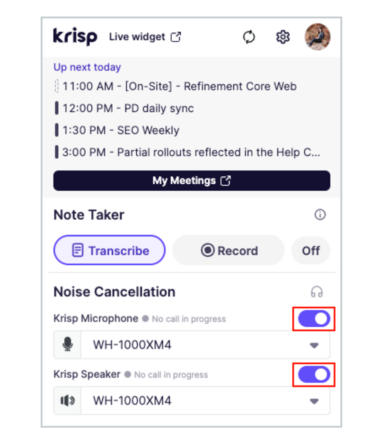
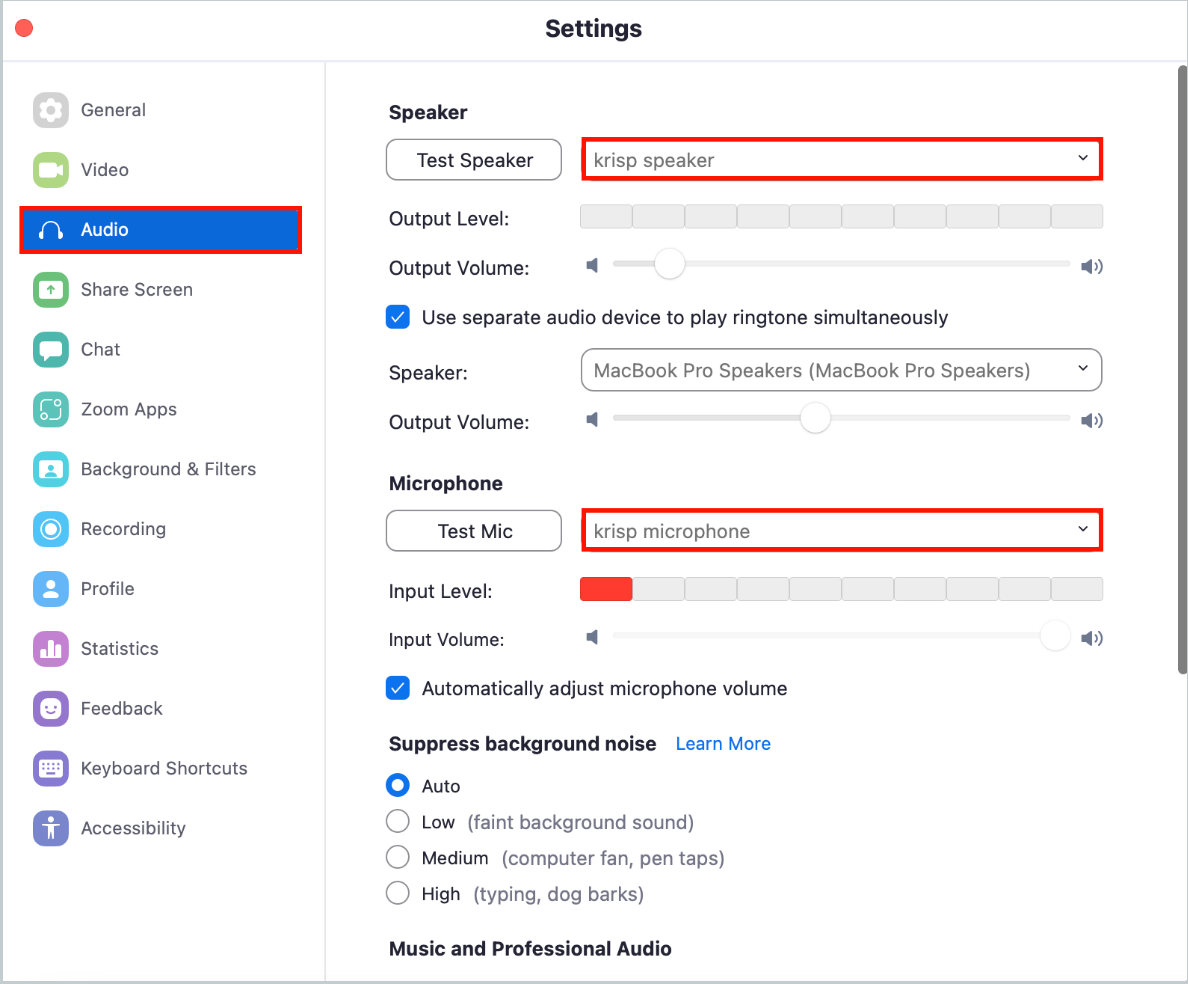
How can you seamlessly integrate the Krisp AI Meeting Assistant with Mac to enjoy high-quality and productive AI transcription?
You can find more than one free transcription software for Mac. These include the Krisp AI Meeting Assistant, Otter, Fireflies, Notta, and more. These transcription tools offer both pros and cons. So, take a closer look at them to find the perfect match for your needs.
You can effortlessly convert your audio into text with the right free transcription software for your Mac. Whether you’re a student, professional, or content creator, these tools offer great features, such as stellar speaker recognition and accuracy, to streamline your work.
Frequently Asked Questions
The best free transcription software depends on your needs. Popular options include Krisp AI Meeting Assistant, Otter.ai, Descript (free tier), and Google Docs Voice Typing. These tools offer reliable transcription features at no cost.
Yes, tools like the Krisp AI Meeting Assistant, Otter.ai (free plan), Google Docs Voice Typing, and Notta.ai provide AI-powered transcription features for free. These tools are ideal for basic needs and smaller projects.
Yes, Google Transcribe, which is part of Google Docs Voice Typing, is entirely free. It enables real-time transcription through your browser with decent accuracy for simple recordings.
Yes, tools like ChatGPT (free version), Copy.ai (free plan), and Writesonic (limited free tier) offer AI writing capabilities. These services are free of charge for basic content creation tasks.