


TL;DR
Krisp’s Accent Conversion (AC) SDK is now available for server-side deployment, giving CCaaS platforms and enterprise voice teams a production-ready way to transform accents in real time.
Krisp AC v3.7 model delivers high naturalness, clarity, pronunciation accuracy, and speaker similarity—running entirely on CPUs with predictable latency and simple frame-based APIs. Integrate it directly into WebRTC/SIP media pipelines, Pipecat or other workflows.
Introduction
Building modern voice experiences for CCaaS platforms, BPOs, and large enterprise contact centers requires solving one persistent issue: cross-accent intelligibility. Customers often struggle to understand agents with strong non-native accents, leading to repeated clarifications, longer handle times, and lower customer satisfaction. Developers need an Accent Conversion (AC) solution that is reliable, low-latency, and easy to deploy inside existing WebRTC, SIP, and media infrastructure—without adding operational complexity or GPU dependencies.
Krisp has steadily advanced its Accent Conversion technology across multiple releases, improving naturalness, pronunciation accuracy, speaker similarity, voice stability, and overall audio clarity. These improvements have been validated through objective benchmarks, large-scale crowdsourced evaluations, and extensive production use inside Krisp’s CX product.
Accent Conversion (AC) has been available through Krisp’s Desktop SDK and JavaScript SDK, enabling in-app and browser-based integrations. Today, we’re expanding availability with the Accent Conversion SDK for servers, bringing the AC v3.7 model quality to real-time backend pipelines with Python and C/C++ SDK.
The server SDK gives you full control over deployment, data handling, latency, and scaling—making Accent Conversion a practical and production-ready component for modern voice platforms.
Why Run Accent Conversion on Your Own Servers?
Running Accent Conversion inside your own infrastructure gives you full control over how the technology behaves in production without relying on external services or introducing new data paths.
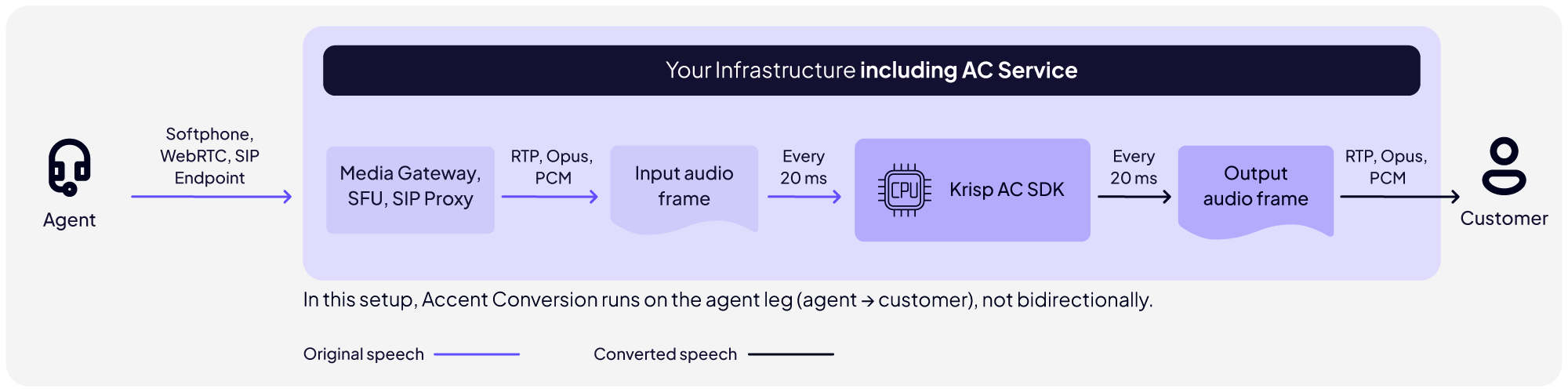
Server-Side Accent Conversion in the Agent-to-Customer Path
Key advantages:
- Data stays within your environment: no audio leaves your network, simplifying compliance for regulated industries.
- Consistent, low-latency: optimized CPU inference enables real-time conversion.
- Flexible deployment: run it in your cloud, on-prem, hybrid environments, or embedded inside your voice infrastructure.
- Full control of scaling: match capacity to your traffic patterns, from low-volume pilots to large global operations.
- Seamless pipeline integration: no change in existing WebRTC, SIP, or media-streaming architectures.
This gives you the reliability, predictability, and control needed to operate Accent Conversion at production scale.
Quickstart: Run Accent Conversion
The Accent Conversion SDK is designed to integrate directly into media pipelines that process audio frame-by-frame. If you’ve previously integrated the Krisp AI Voice SDKs, the Accent Conversion SDK will feel immediately familiar. This allows you to reuse existing code and drop Accent Conversion into their media path with minimal changes.
Python
 import krisp_audio

def log_callback(log_message, log_level):
logging.info(f”[{log_level}] {log_message}”)

# initialize Krisp SDK global instance
krisp_audio.globalInit(“”, log_callback, krisp_audio.LogLevel.Off)

# Create Accent session with the specified configuration
model_info = krisp_audio.ModelInfo()
model_info.path = “path/to/accent_model_file.kef”

ar_cfg = krisp_audio.ArSessionConfig()
ar_cfg.inputSampleRate = inputSampleRate
ar_cfg.inputFrameDuration = inputFrameDuration
ar_cfg.outputSampleRate = outputSampleRate
ar_cfg.modelInfo = model_info

arFloat = krisp_audio.ArFloat.create(ar_cfg)

# Frame by frame processing of the given audio stream
for i in range(0, 1000) # frame count
processed_frame = arFloat.process(frame)

# Free the Krisp SDK global instance
arFloat = None
krisp_audio.globalDestroy()
What This Code Demonstrates
- Initializing the Krisp SDK runtime
- Loading an Accent Conversion model
- Creating a session tuned to your audio pipeline
- Processing audio frame-by-frame (e.g., 20 ms frames)
- Gracefully shutting down the SDK
AI Model Summary
Krisp’s Accent Conversion v3.7 model delivers significant improvements in naturalness, pronunciation accuracy, speaker similarity, voice stability, and audio clarity. These gains were validated through crowdsourced evaluations, objective phoneme-level benchmarks, and extensive production deployments in Krisp’s CX product.
| Before | After | |
| Indian | ||
| Filipino |
More detailed qualitative results and accent-specific evaluations are available in our Accent Conversion 3.7 article.
Algorithmic Latency & Audio Handling
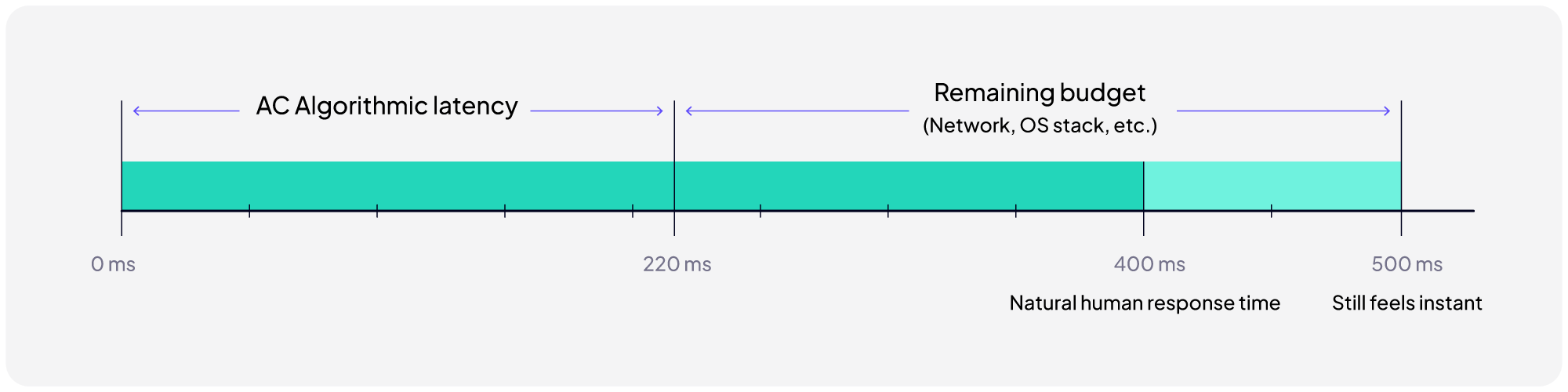
- Algorithmic latency: ~220 ms (fixed), leaving sufficient budget for transport and media-pipeline overhead while staying within the 400–500 ms one-way latency window required for natural conversational flow.
- Audio format: Operates internally at 16 kHz; SDK automatically handles up/downsampling. No preprocessing required.
- Voice isolation: Built-in voice isolation enables AC to run directly after the media gateway/SFU without requiring preceding Noise Cancellation stage.
Get Started with AI Voice SDK
Everything you need to integrate Accent Conversion into your platform is available here:
- Get Access to Accent Conversion SDK
- SDK Documentation & Integration Guides
- Detailed Accent Conversion Model Quality Benchmarks (v3.7)