🚀 A smarter Accent Conversion experience for multilingual teams
Accent Conversion helps agents deliver clearer, more familiar English for customers. But in multilingual environments where agents switch between English and non-English calls, manually managing Accent Conversion can add friction, increase cognitive load, and result in inconsistent audio quality.
Today, we’re making that experience smoother.
Accent Conversion just got smarter
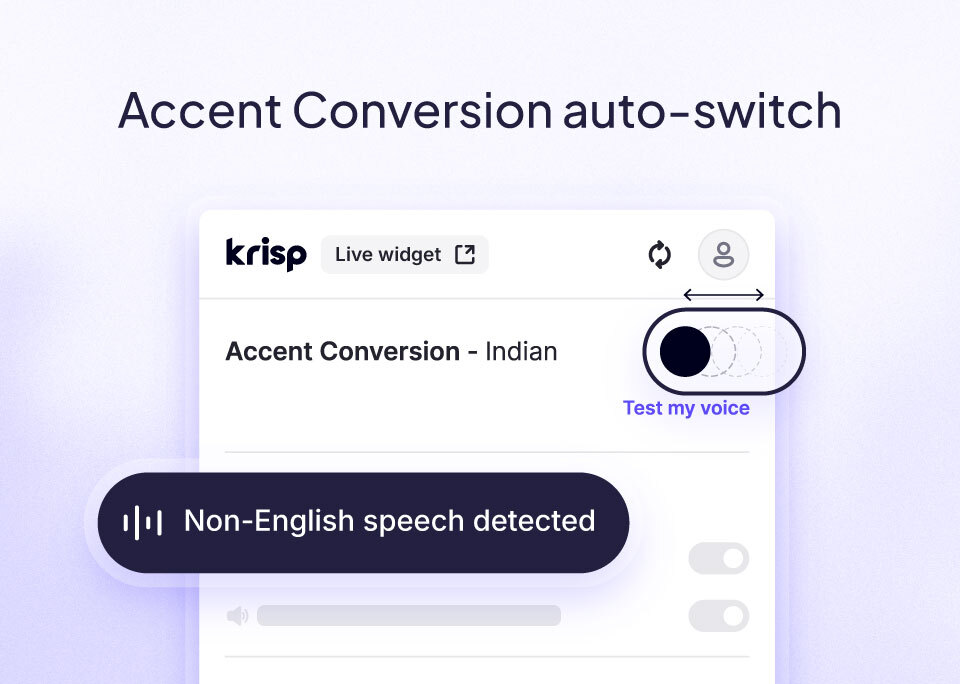
We’re excited to introduce Accent Conversion (AC) auto-switch — a simple but powerful upgrade that automatically adjusts Accent Conversion based on the language of the call.
AC auto-switch detects when the conversation isn’t in English and updates Accent Conversion’s state accordingly, keeping it active only for English calls.
No second-guessing.
No extra steps.
No mid-call toggling.
AC auto-switch also resets Accent Conversion to its default state after each call, so agents always start with the right settings. If the situation changes mid-call, agents can manually turn it on or off at any time.
The result is clearer audio, fewer distortions, and a smoother, more predictable workflow for agents moving between languages throughout the day.
How AC auto-switch works
AC auto-switch detects whether the conversation is in English at the start of the call and keeps Accent Conversion ON only for English calls.
At the end of the call, AC resets to its default state, whether that default is ON or OFF, ensuring agents always begin the next call with the right setup.
If the language shifts mid-call, agents maintain full control with a simple manual override. The feature stays flexible, predictable, and out of the way.
Benefits at a glance
- Clearer audio in multilingual workflows
- Less cognitive load for agents
- Fewer manual toggles for each call
- Predictable behavior with automatic reset after every call
- Full agent control with manual override
Who can use the feature?
AC auto-switch is available to all Accent Conversion users by default.
To enable it, go to Team Settings → Accent Conversion → Enable Accent Conversion → Auto-switch. Once turned on, it automatically applies to all team users and works on their very next call.
If your team regularly moves between English and non-English conversations, AC auto-switch will make Accent Conversion easier, safer, and more intuitive to use — right away.
Learn more about Accent Conversion here.